CrossPoint-based fork
CrossInk
v1.5.0 · MITTypography + reading stats fork
Best for: Readers who want extra fonts, reading statistics, and Bionic Reading. Also one of the two forks officially supported on locked devices.
- Reading statistics: books read, time, sessions, pages/minute, with cross-device sync and backup.
- Bionic Reading and Guide Dots modes; extra reader fonts (ChareInk, Lexend Deca, Bitter).
- Synthetic-glyph fallback that fixes missing Unicode characters that render as diamonds on stock.
- EPUB dark mode, Minimal and Lyra Carousel themes, configurable controls.
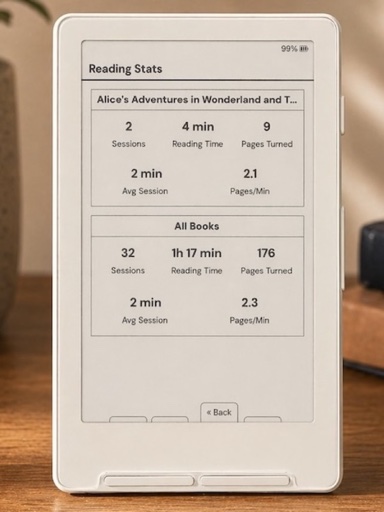
CrossInk runs on the Xteink X3 and X4. The install is 3 steps via web flasher (Custom .bin), start to finish:
- 1
Download a firmware-*.bin from the CrossInk releases page.
- 2
Open crosspointreader.com/#flash-tools and select your model.
- 3
Choose the "Custom .bin" option, select the downloaded file, and flash.
First flash? The mechanics are the same across every fork. Compare the five flashing methods on the directory, or follow the step-by-step flash CrossPoint without panicking guide.
CrossInk is a medium-risk flash. Settle two things before you touch the flasher: whether your Xteink shipped locked, and how you'd get back.
Locked devices & CrossInk
Officially supported on locked devices (the other being CrossPoint): install it over the air with the CrossPoint OTA Unlocker. On unlocked devices, use the web flasher’s Custom .bin option.
Not sure if your unit is locked? Read the locked-device safety brief, or the full locked vs unlocked buying guide.
How to revert CrossInk
On an unlocked Xteink you have three ways back:
- 1Re-flash stock. The same web flasher offers official Xteink firmware.
- 2Restore a backup. “Write full flash from file” brings back the exact prior state, if you saved one first.
- 3Swap boot partition. A quick rollback at xteink.dve.al/debug.
On a locked unit there is no USB safety net. That is why locked devices stick to CrossPoint/CrossInk.
The one caveat: A solo "personal" fork — not listed as a default in the flasher (use Custom .bin). Keep folders under ~200 files for speed.
Not sure CrossInk is the right pick? Take the 30-second firmware chooser.
CrossPoint Reader
The main community firmware
The default: best all-round reader
Full guidePapyrix
More formats, one binary for both devices
FB2 / Markdown / HTML, multi-script
Full guideCrossPet
Gamified reading + Vietnamese
Vietnamese UI + gamified virtual pet & games
Full guideMicroreader
Deliberately minimal, EPUB-only
Minimal, distraction-free EPUB-only
Full guideAvesO3
For AO3 fanfiction readers
AO3 fanfiction workflow
Full guideSUMI
Offline apps, dictionary & Lua plugins
Offline apps, dictionary, Lua plugins, emulator
Full guideCrossInk details verified August 11, 2026 against its GitHub repo, README and releases. PocketInk is independent and not affiliated with Xteink. Firmware names and versions change quickly — check the repo for the latest.