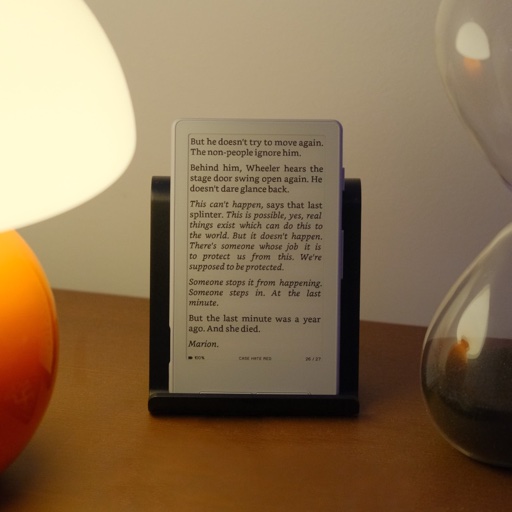
CrossPoint Reader
The main community firmware
X3 ✓ X4 ✓ Risk: Medium
The default — best all-round reader
Full guideThe Firmware Directory
The Xteink ecosystem moves fast and the names blur together. This is the owner-friendly map: what each firmware is, who it is for, how to flash it, and how to do it without bricking a locked device. Every repo, version, and step was checked against primary sources — open any firmware for its full guide.
Verified June 24, 2026. Not affiliated with Xteink. Flashing custom firmware can void your warranty.
Four questions and we narrow it to the firmware that fits your device and your reading — and that is safe for a locked unit. Every answer is fact-checked. Open the full-page chooser.
Firmware chooser
~30 secondsEvery custom firmware in this guide drops Bluetooth to free up the tiny ESP32-C3 RAM for reading. Only stock keeps it (a few forks add a BT page-turner back).
Pick the row that sounds like you. When in doubt, the answer is CrossPoint.
“I just want the best all-round reader”
CrossPoint Reader
The main community firmware. Best-supported, works on X3 and X4, one-click web flasher, revertible.
“I want reading stats + nicer typography”
CrossInk
A CrossPoint fork that adds reading statistics, Bionic Reading, and fixes for missing Unicode glyphs.
“My books are FB2, Markdown, or HTML”
Papyrix
Adds FB2 / Markdown / HTML on top of EPUB, with one binary that auto-detects X3 vs X4. (Higher risk — no OTA.)
“I read Chinese, Japanese, or Korean”
CrossPoint CJK / KO
Localized forks with CJK font rendering and native menus. KO also runs on the X3.
“I live on AO3 fanfiction”
AvesO3
An AO3-styled library that checks for and downloads new chapters on-device. X4, experimental.
“I want the simplest possible EPUB reader”
Microreader
Deliberately minimal: drop EPUBs anywhere on the SD card and read. X4 only, flashed via PlatformIO.
“I want offline apps, a dictionary & plugins”
SUMI
Offline-first (no WiFi) with ~20 built-in apps, a StarDict dictionary, and a Lua plugin framework. X3 + X4.
The firmware most people actually flash. Each has its own page with benefits, install steps, its locked-device situation, and how to revert.
The main community firmware
The default — best all-round reader
Full guide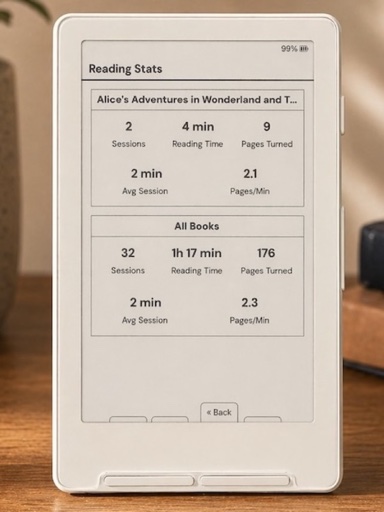
Typography + reading stats fork
Reading stats, Bionic Reading, glyph fixes
Full guide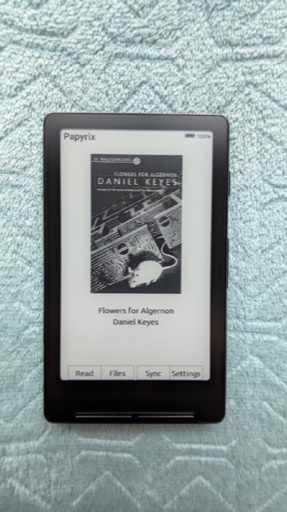
More formats, one binary for both devices
FB2 / Markdown / HTML, multi-script
Full guide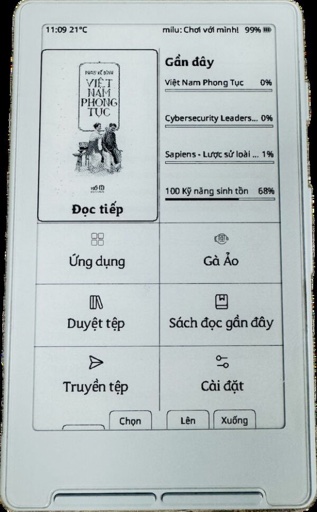
Gamified reading + Vietnamese
Vietnamese UI + gamified virtual pet & games
Full guideDeliberately minimal, EPUB-only
Minimal, distraction-free EPUB-only
Full guide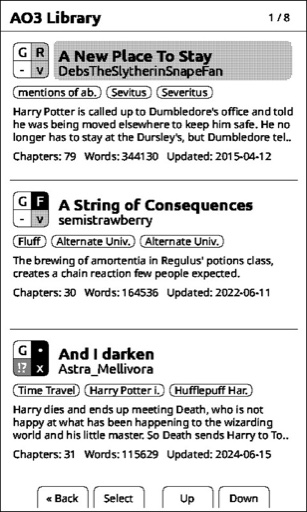
For AO3 fanfiction readers
AO3 fanfiction workflow
Full guide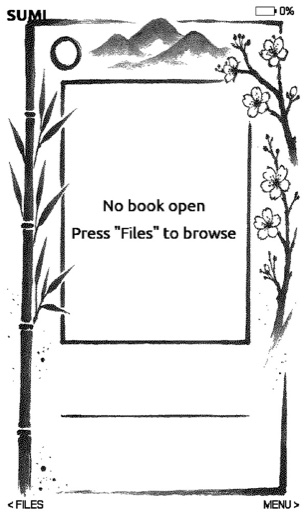
Offline apps, dictionary & Lua plugins
Offline apps, dictionary, Lua plugins, emulator
Full guideThirty firmware paths for the X3 and X4 — every one checked against its own repo. ✓ supported · ~ partial/unverified · ✕ not supported.
| Firmware | Type | X3 | X4 | Version | Risk | Best for |
|---|---|---|---|---|---|---|
| CrossPoint Reader | Main | ✓ | ✓ | v1.3.0 | Medium | The default — best all-round reader |
| CrossInk | Reader fork | ✓ | ✓ | v1.3.3 | Medium | Reading stats, Bionic Reading, glyph fixes |
| Papyrix | Reader fork | ✓ | ✓ | v1.24.3 | High | FB2 / Markdown / HTML, multi-script |
| CrossPet | Reader fork | ✓ | ✓ | v1.8.3 | Medium | Vietnamese UI + gamified virtual pet & games |
| SUMI | Reader fork | ~ | ✓ | v0.6.3 | Medium | Offline apps, dictionary, Lua plugins, emulator |
| inx | Reader fork | ✕ | ✓ | v1.0.14 | Medium | Clean reader: annotations + image rendering |
| CrumBLE | Reader fork | ~ | ✓ | v4.5.3 | Medium | BLE page-turner remote + collections |
| CPR-vCodex | Reader fork | ~ | ✓ | v1.3.0.27 | Medium | Reading habits: stats, streaks, dictionary, flashcards |
| CrossPoint CJK | Localization | ✕ | ✓ | v0.3.4 | Medium | Chinese / Japanese reading + UI |
| CrossPoint KO | Localization | ✓ | ✓ | v1.3.0-ko | Medium | Korean reading + UI (also runs on X3) |
| Microreader | Minimal | ✕ | ✓ | 2.0-dev | Medium | Minimal, distraction-free EPUB-only |
| AvesO3 | Niche | ~ | ✓ | v1.2.2 | High | AO3 fanfiction workflow |
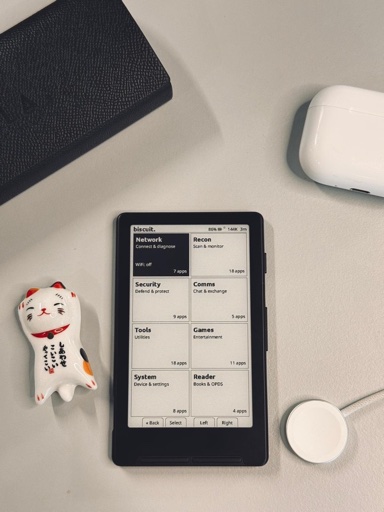
| Biscuit | Experimental | ✕ | ✓ | v0.1.0 | High | ESP32 "pocket computer" multi-tool |
| doom-xt4 | Experimental | ✕ | ✓ | v1.0.2 | High | A DOOM-style raycaster (novelty) |
| PlusPoint | Experimental | ✕ | ✓ | preview | High | Experimental from-scratch C++ OS (X4) |
| TernOS | Experimental | ✕ | ✓ | v0.4.0 | High | Rust OS w/ PalmOS emulation (needs .trbk books) |
| TRMNL | Repurpose | ✕ | ✓ | — | High | Turn the X4 into an e-ink dashboard (not a reader) |
| CrossPoint JP | Localization | ✓ | ✕ | v0.1.7 | Medium | Japanese: furigana + vertical writing (X3) |
| CrossMux | Reader fork | ✓ | ✓ | v1.4.0 | Medium | Apps hub + WeChat Reading; Chinese build |
| WitchHunt Reader | Reader fork | ✓ | ✓ | v2.02 | Medium | Clock + Markdown; the renamed CrossPoint++ |
| SEEK Reader | Reader fork | ✕ | ✓ | v1.0.7 | Medium | Quick-settings reader + dictionary (X4) |
| aalu | Reader fork | ✕ | ✓ | v1.5.4 | Medium | Auto series grouping (X4, build-it-yourself) |
| CrossPoint Flow | Reader fork | ✕ | ✓ | v3.0.1 | Medium | Lua plugins + iPod-style UI, CJK |
| CrossPoint BLE | Reader fork | ✓ | ✓ | v1.3.1 | Medium | Bluetooth page-turner remotes |
| Microreader+ | Minimal | ✓ | ✓ | main | Medium | Minimal EPUB; adds X3 + SD flashing |
| DX34 | Reader fork | ✕ | ✓ | v6.0.0 | Medium | Richer EPUB controls (X4 / DX34) |
| CrossLink | Reader fork | ✓ | ✓ | v20260524 | High | Risky: non-standard partition table |
| CrossWordle | Experimental | ✕ | ✓ | v1.1.1 | High | Wordle game (abandoned) |
| Rustmix | Standalone | ✕ | ✓ | v1.1.0 | High | Hindi / Devanagari reading (X4, advanced) |
| Stock Xteink | Stock | ✓ | ✓ | — | None | Out-of-box simple reader (what you start on) |
Risk is for a non-technical owner: web-flasher installs on unlocked devices are low-risk and revertible; "High" usually means experimental, single-maintainer, or dangerous on locked units. The seven majors link to full guides; the rest are detailed below.
CrossPoint forks that add non-Latin reading and native menus.
CrossPoint CJK · v0.3.4 · X4
Chinese / Japanese reading + UI with external CJK fonts and typography fixes. Simplified and Traditional builds. repo
CrossPoint KO · v1.3.0-ko.1 · X3 + X4
Korean UI + full Hangul/Hanja rendering. Notably, it runs on the X3 as well as the X4 (the CJK build is X4-only). Ships a complete standalone image set with SD-card update + WiFi OTA. Actively maintained. repo
CrossPoint JP · v0.1.7 · X3
A Japanese-focused CrossPoint fork (based on crosspoint-reader v1.2.0 plus the CJK fork’s improvements) adding furigana (ruby), vertical writing, downloadable JP fonts, and on-device Aozora Bunko search. Confirmed working on the Xteink X3 only — X4 is unconfirmed — and there is no warranty. A separate, newer fork (mtskf/crosspoint-reader-jp) localizes the UI to Japanese on both models but does not add furigana or vertical text. repo
Active CrossPoint/CrossInk forks with a clear niche.
inx · v1.0.14 · X4
A clean-reading CrossPoint fork: bookmarks, annotations, KOReader sync, native image rendering (JPEG/PNG/BMP), and a folder library with favorites. Flashes via xteink.dve.al. repo
CrumBLE · v4.5.3 · X4 (X3 WIP)
A CrossInk fork whose standout is real Bluetooth page-turner remote support — the one way to get a BT remote back on custom firmware — plus a Collections system, configurable bookshelf grid, and dictionary lookup. Fast-moving repo. repo
CPR-vCodex · v1.3.0.27 · X4 (X3 reported)
A CrossPoint fork built around long-term reading habits: full analytics (stats, streaks, achievements, heatmaps, session history), an on-device StarDict dictionary loaded from the SD card, offline flashcards, EPUB bookmarks, Bionic Reading, and extra SD-card fonts (including its own ChareInk). Ships its own one-click web flasher. Note: the maintainer documents only the unlocked install — a locked-X4 SD route is community-reported, not official. repo · flasher
CrossMux · v1.4.0 · X3 + X4
A CrossPoint fork for the X3/X4 that adds an Apps hub of mini-games, reading analytics, extra standby faces, and WeChat Reading (WeRead) integration — plus a separately-built Simplified Chinese firmware. Inherits CrossPoint’s OTA + web-flasher install; on a USB-locked unit, only flash firmwares the unlock tool officially supports. repo
WitchHunt Reader · v2.02 · X3 + X4
A CrossPoint-based reader fork for the X3/X4 — the continuation of the project once called CrossPoint++ (same maintainer, renamed). Adds a software clock on both models, rich Markdown/table/GIF rendering, bidirectional KOReader sync, and a weather panel. Does not support CJK or right-to-left text. repo
SEEK Reader · v1.0.7 · X4
An independent X4 firmware originally forked from CrossPoint, adding an in-reader quick-settings (Aa) overlay, multiple home themes, an offline StarDict dictionary, and heuristic KOReader sync. X4-only and flashed over USB-C with PlatformIO (no SD-card flashing); revert to stock via the xteink.dve.al web flasher. repo
aalu · v1.5.4 · X4
A personal X4 fork of SEEK Reader (CrossPoint base) that adds automatic series grouping, a reworked stats dashboard, Bionic Reading, an offline dictionary, and KOReader sync. There are no prebuilt installers — the only way in is to compile and flash it yourself over USB-C with PlatformIO. repo
CrossPoint Flow · v3.0.1 · X4
A heavily modified CrossPoint Reader fork for the X4 adding an iPod-style “Flow” interface, full CJK rendering with external fonts, a large-file XTC format, and a Lua plugin system with built-in games and a flashcard app. Installs and updates via the xteink.dve.al web flasher; X4 only. repo · flasher
CrossPoint BLE · v1.3.1 · X3 + X4
A CrossPoint fork for the X3/X4 that adds Bluetooth-LE page-turner support, with a built-in remote database and on-device button learning. The headline 1.3.1-personal build is an experimental personal-use release with extra games and themes enabled; its BLE work is what CrumBLE credits upstream. repo · flasher
Microreader+ · main (no release) · X3 + X4
A fork of CidVonHighwind/microreader that adds X3 support (auto-detecting the model at boot) and on-device SD-card firmware flashing with image validation and OTA rollback — the minimal EPUB reader, now on the X3 too. The author states it is not recommended for locked devices. repo
DX34 · v6.0.0 · X4 / DX34
A fast-moving, reading-first CrossPoint fork for the X4 / DX34-class reader, adding richer EPUB controls, sleep wallpapers, WebDAV/WebSocket Wi-Fi transfer, OPDS, KOReader sync, and OTA with a downgrade guard. Single-maintainer and English-first (no Bluetooth); does not migrate reading progress from other firmwares. repo · flasher
Real, verified projects — but novelty or bleeding-edge. Treat as high-risk and X4-only unless noted.
Most forks share CrossPoint’s flash layout, so these methods apply across the whole directory. Start with the web flasher unless a project says otherwise.
Easiest · revertible · the default
Unlocked X3/X4. Use desktop Chrome or Edge (Firefox support is inconsistent); Safari is not supported — it has no WebSerial.
For technical users / custom builds
Unlocked devices, Python installed.
Works without a PC · the locked-X3 rescue
Devices whose firmware/bootloader supports SD update (added to CrossPoint in PR #1786, the 1.3.0 line). Flashes a locked X3 directly from stock. On a locked X4 there is no confirmed stock SD key-combo — get CrossPoint on with the OTA Unlocker first, then its in-app SD update handles the rest.
On-device updates · rescue for locked units
WiFi-connected devices. The OTA Unlocker installs CrossPoint/CrossInk over the air on USB-locked X3 AND X4 units — the recommended first step for a locked X4.
For developers and contributors
Anyone building/modifying firmware.
An honest note: CrossPoint itself has no on-device plugin store — and that is by design.
What people call "plugins" on CrossPoint is really a set of SD-card and desktop extensions (below). If you want
actual scriptable, installable plugins, one fork genuinely delivers them today: SUMI — a sandboxed Lua system where
.lua files in /custom/ become launchable apps. PlusPoint is sometimes named here too, but it is an experimental from-scratch C++ OS proof-of-concept, not a JavaScript-app platform.
The real "plugin" layer for CrossPoint. 23+ prebuilt families (Literata, Merriweather, Atkinson Hyperlegible, IBM Plex…). Download over WiFi on-device, upload via the web UI, or copy to /.fonts/ on the SD card. Build your own from any TTF with the font builder.
crosspoint-fontsSelectable built-in UI themes — Classic, Lyra, Lyra Extended, RoundedRaff. (Custom user themes are not installable; you pick from the built-ins.)
crosspointreader.comDrop 24-bit BMPs (480×800 for X4, 528×792 for X3) into /.sleep/ on the SD card, or a single sleep.bmp in the root, for custom wallpapers/screensavers.
guideA desktop Calibre device driver that sends EPUBs to the reader over WiFi/WebSocket with auto-discovery. Installed into Calibre, not the device.
calibre-pluginsConvert books to the device-native format for the fastest rendering and control over grayscale: bigbag/epub-to-xtc-converter (web + CLI) and CrazyCoder/cr2xt (desktop). For manga, comics, and PDFs, varo6/xtcjs adds dithering and spread-splitting.
xtcjs (manga/PDF)The most genuine plugin system in the scene: SUMI firmware ships a Lua scripting framework for user-written extensions, alongside ~20 built-in apps and a dictionary. If you actually want “installable plugins”, this is it.
SUMIOften mislabelled as a JavaScript-app platform — it isn’t. PlusPoint is a from-scratch C++ OS proof-of-concept for the X4 (the app launcher isn’t built yet): promising, but not a working plugin system today. For real scriptable plugins, use SUMI (Lua).
pluspoint-readerThis is the part that actually bricks devices. Around April 2026 Xteink began shipping some units with USB flashing disabled. Read this before touching a flasher.
There’s no reliable way to tell from the box — weak hints are an outer-box barcode sticker or a plain brown package. The only sure test is to connect over USB and try to flash. Units bought direct from xteink.com or Amazon are reported unlocked; AliExpress and other grey-market imports are the ones that have shipped locked. Correlated, not guaranteed — re-verify at purchase time.
X3: two routes — the SD-card method (rename a build to update.bin, hold the left button + power) or the OTA Unlocker. X4: the OTA Unlocker only — do not improvise the X3 SD trick on an X4, which can brick it. Either way, only CrossPoint and CrossInk are supported on locked units.
Flashing unsupported firmware (e.g. Papyrix, which has no OTA) on a locked device can leave no update or recovery path at all. On a locked unit you also lose the USB safety net, so there is no clean rollback if an SD/OTA flash fails. Keep a known-good firmware.bin on the SD card.
Unconfirmed. The working software workarounds (Unlocker, SD method) suggest the lock lives at the stock-firmware/update layer rather than a permanent silicon eFuse — but no teardown has proven it. Assume some risk and don’t treat "unlocked" as guaranteed reversible.
Golden rules: back up the full flash first (on unlocked units), use a USB-C data cable, wake the device before connecting, only flash CrossPoint/CrossInk on locked units, and never write esptool to 0x0 — use 0x10000.
Buying advice in full: locked vs unlocked — buy the right unit.
Still choosing a device? X3 vs X4: which should you buy?
The questions owners actually ask, each fact-checked against primary sources. Browse the full 49-question FAQ.
For most owners the answer is CrossPoint Reader: it is the open-source mainline (MIT, C, ~5.4k GitHub stars — a volatile counter — currently v1.3.0), it runs on both the X3 and X4, and it is one of only two firmwares the OTA Unlocker officially supports, so it is the safe default on a locked unit too. It covers EPUB 2/3, .txt, .bmp and the native .xtc/.xtch format, with Wi-Fi transfer, Calibre/OPDS, custom SD-card fonts and a standalone SD-card update path (added in v1.3.0). Note it does not render PDF, by design.
Sources: crosspoint-reader/crosspoint-reader · CrossPoint flasher / install
On an unlocked unit, yes — re-flash the latest official firmware from the CrossPoint web flasher, and you can save a full-flash backup over USB beforehand so most bad flashes are a quick fix. On a locked unit there's no USB safety net (the backup runs over USB, which is what's blocked), so keep a stock update.bin on your SD card as your rollback instead.
There's no reliable way to tell from the box, so the only sure test is to plug into USB in Chrome or Edge and see whether the CrossPoint web flasher detects the device. A locked unit never enumerates as a USB serial port, so neither the web flasher nor the esptool CLI can see it. Buying direct from xteink.com or Amazon is usually unlocked but not guaranteed (a unit received directly from XTEINK was reported as locked), and the "overseas units are exempt" claim is not established. If the device never appears over USB, treat it as locked.
Sources: CrossPoint README - USB-locked devices · trilwu/crosspet #28 - device never enumerates as serial port · CrossPoint #2029 - locked unit received direct from XTEINK
Stick to CrossPoint or CrossInk - they're the only two firmwares the OTA Unlocker officially supports, and both ship an in-app SD-card update as a way back. The README warns that flashing any other firmware on a USB-locked device can permanently brick it or leave it stuck on that firmware with no recovery path.
Sources: CrossPoint README - only CrossPoint & CrossInk supported · CrossPoint Unlocker - serves CrossPoint/CrossInk
First make sure the device is awake and sitting at the home screen (not asleep) and that you're using a USB-C cable that supports data, not a charge-only cable. If it still never appears in Chrome or Edge, your unit is most likely USB-locked — connecting in the flasher and seeing whether it's detected is the only sure test for the lock — and you'll need the SD-card method (X3) or the OTA Unlocker (X4) instead.
Sources: crosspointreader.com · CrossPoint README
No. Flashing replaces the device firmware, not the contents of the SD card where your books, fonts and cached metadata live. If you do want to clear cached metadata on CrossPoint, deleting the /.crosspoint folder forces a full cache regeneration on next open, but your book files are untouched.
Not directly. CrossPoint's reader engine handles EPUB 2/3, the native .xtc/.xtch formats, .txt, and .bmp, but PDF rendering is explicitly out of scope. The workaround is to convert the PDF to the device's .xtc format first using a web tool like xtcjs, which turns PDFs, CBZ comics, images, and even video into XTC optimized for the X4 and X3.
Sources: crosspoint-reader (supported formats) · varo6/xtcjs (PDF/comic to XTC converter)
Custom XTEINK firmware drops Bluetooth to free memory for reading features, so none of the firmware in the standard chooser ships it. If you need Bluetooth, stock is the only firmware in that guide that has it; a couple of community forks (notably CrumBLE) have added a Bluetooth page-turner back.
The specific community complaints behind this page, and the firmware that solves each.
| The problem | What fixes it | Firmware |
|---|---|---|
| Stock firmware feels basic / clunky | Flash CrossPoint — it is the whole reason the scene exists. | CrossPoint |
| Missing Unicode characters show as diamonds | CrossInk added synthetic-glyph fallback rendering (PR #104). | CrossInk |
| My books are FB2 / Markdown / HTML | Papyrix parses those formats natively. | Papyrix |
| I read Chinese / Japanese / Korean | Use the CJK or KO localization forks (KO also runs on X3). | CJK / KO |
| I want reading stats and Bionic Reading | CrossInk tracks sessions, pages/min, and adds Bionic mode. | CrossInk |
| I want reading streaks, an on-device dictionary & flashcards — close to CrossPoint | CPR-vCodex adds analytics, streaks, achievements, an SD-card StarDict dictionary, and flashcards on the CrossPoint base. | CPR-vCodex |
| Buttons should toggle bold / font size / dark mode | CrossPoint and its forks add button remapping and reader quick settings (bold, Bionic, dark mode). | CrossPoint forks |
| Keeping new AO3 chapters in sync is a chore | AvesO3 checks for and downloads new chapters on-device. | AvesO3 |
| I just want to dump EPUBs and read | Microreader scans the whole SD card — no folders, no fuss. | Microreader |
| I want offline apps, a dictionary, or real plugins | SUMI is offline-first with ~20 apps, a dictionary, and a Lua plugin framework. | SUMI |
| I want a Bluetooth page-turner remote | CrumBLE (a CrossInk fork) adds BLE remote support and collections. | CrumBLE |
| My device shipped USB-locked and won’t flash | X3: SD-card method (from stock) or the OTA Unlocker. X4: the OTA Unlocker, then its in-app SD update. Stick to CrossPoint/CrossInk. | See safety |
The desktop apps, plugins, self-hosted servers and book sources around the Xteink — getting books onto the device, optimised, and synced. They are all free. For the firmware itself, see the directory and plugins & customization above.
The essential free desktop app for organising, converting and sending books to the Xteink. Converts EPUB / MOBI / PDF, edits metadata, and (with the plugin below) sends wirelessly.
Adds CrossPoint as a wireless device inside Calibre and sends EPUBs over WebSocket to the on-device web server — no cable, no SD swap. Requires CrossPoint firmware installed.
Syncs reading progress from the X4 microSD card back into Calibre custom columns. Pull the card, run Calibre, and your progress updates.
Generates EPUBs tuned for the X3 / X4 screens with the correct 4-level grayscale treatment and image fit-box handling.
Self-hostable reading-position sync. CrossPoint's KOReader sync client pushes your reading progress (position + percentage, keyed by document) here so you can pick up where you left off across devices. Docker-friendly.
Self-hosted Calibre web library + OPDS server. CrossPoint's built-in OPDS client downloads books straight from it — no USB or file transfer needed. Docker-based.
75,000+ free public-domain EPUBs at Project Gutenberg; Standard eBooks re-typesets the classics with far better formatting. Both DRM-free and work on stock or custom firmware.
Sources include each project’s GitHub repo, README, and releases, plus crosspointreader.com, community flashing guides, and owner reviews on r/XTEINK, verified June 24, 2026. Device screenshots are from each project’s own repository or project site, used to show the firmware running. PocketInk is independent and not affiliated with Xteink. Firmware names and versions change quickly — check the linked repos for the latest.